
Report Designer
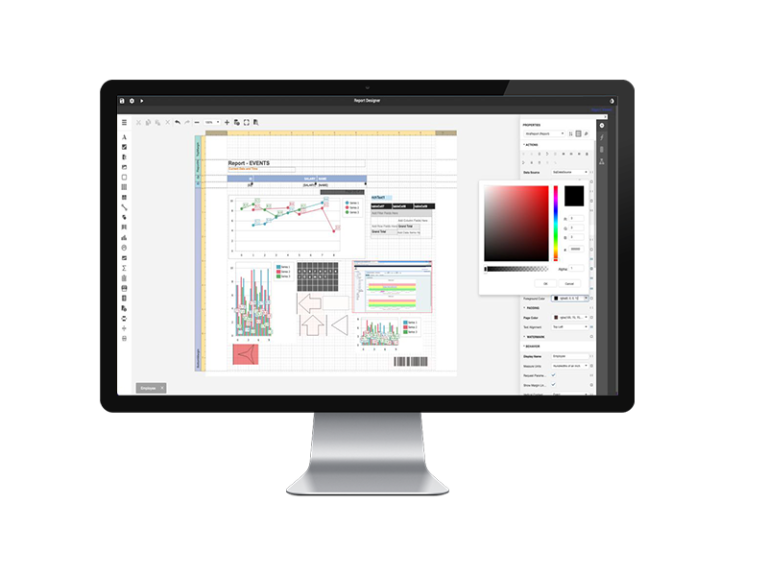
Report Designer is a 100% configurable SCADA reports WEB environment with an intuitive design and aims to generate diverse reports. The Report Designer license is also integrated into the WEBICC PROFESSIONAL license.The rich set of controls allows you to create reports of unparalleled elegance and clarity. High speed of generating reports with technological data from industrial environments.
SCADA REPORTS - REPORT DESIGNER
Report Designer is a configurable SCADA reports environment for generating professional-looking reports. It is ideal for connecting to databases in SCADA applications and beyond. The wizard facilitate access to the data registered in the database for the creation of the usual reports and for those of high complexity the integrated SQL language completes all the necessities. Includes data management capabilities to maximize productivity and minimize hard work for reporting. It allows you to customize reports so that end users can benefit from the power of information in a way that best suits their needs. The generated reports can be physically distributed, by exporting in the classic formats both on your own work machine and via email.
- MS SQL Server
- MySQL
- SQLite
- JSON
OPTIONAL:
- PostgreSQL
- Oracle
- Microsoft Excel
- Entity Framework / XPO
Thus we highlight editable graphic primitives such as:
- Lines
- Shapes
- Tables
- Charts
- Pictures
- Text
Ability to customize individual report parameter editors
Define custom parameter types
Hide and disable report parameter editors based on user input
Combine report parameters into visual groups
Pass report parameter values directly to a data source query
Create multi-value, data-bound, nullable and date range report parameters
| Report Designer | Features |
|---|---|
|
Cross-Platform Reporting |
|
|
Fully Customizable Report Types |
|
|
Royalty-Free Designers |
|
|
All major data providers are fully supported. |
|
|
Rich Data Visualization |
|
|
Comprehensive Suite of UI Elements |
|
|
Merge PDF & DOCX |
|
|
Preview. Edit. Print. Expor |
|
|
Generate editable, accessible, and secure PDFs. |
|
|
Data Shaping & Analytics |
|
Reporting, as part of a SCADA system, is one of the most important software tools for extracting and processing information from a technological process.
The reporting is not designed to display information in real time, but to extract and process it from the data history and display it in common file formats to be exported. An integrator will customize the report in a format suitable for the beneficiary and will integrate important data about the technological process such as:
- operating hours of mechanisms;
- various consumptions: gas, water, fuel, electricity, thermal energy;
- incoming and outgoing quantities;
- medium values;
- alarms with the most important events;
Most customers need information regularly extracted from SCADA for analysis purposes (load studies, energy reduction initiatives, performance analysis, etc.).
In the absence of SCADA reports, which have the role of automatically extracting information from historical databases, clients will manually extract the data and process it in Excel spreadsheets, a time-consuming manual work that can also introduce mistakes. It is practically a waste of time because there should be the reporting module integrated in the SCADA system.
Report Designer is a software tool recommended for creating professional industrial reports. It connects to databases with information from SCADA software environments and without programming knowledge, reports are built regardless of their complexity.
Having a built-in web server, reports can be made both locally and remotely as long as there is an Internet connection. The results can be distributed at any time with a single click to certain preset email destinations.
To access SCADA reports securely, a VPN connection can be created in addition to restricted access with user and password.
For complex SCADA reports, SQL is the programming language used both scriptively and graphically.
The licensing of the SCADA report software, Report Designer, is unique, it allows the generation of reports unrestricted by the number of users and the number of simultaneous accesses.
Designed for users who do not have programming knowledge, the report editor has an intuitive, easy-to-use interface that allows users to develop professional reports simply and easily, through the sophisticated library of graphic components and predefined functions. This software tool is designed and intended for automation engineers but also for IT professionals who have to develop customized reports.
The file formats generated are the usual ones: pdf, xlsx, docx, rtf, mht, Text, csv, image, html.
Common built-in interfaces for databases are: MSQL Server, MySQL, SQL Lite, JSON.
If your SCADA solution does not have built-in reporting, a solution like Report Designer will work for you. Although reporting may require investment of time and cost, it is our experience that it will accelerate the return on your SCADA investment.
 English
  Romanian